
Inbox zero is misunderstood. It is not a personality trait, a moral score, or a demand that your inbox stay empty every minute of the day. For beginners, inbox zero means you process email in batches until nothing sits there without a decision. Empty is a checkpoint, not a lifestyle brand.
If your inbox has thousands of messages, you do not need shame. You need a realistic system: fewer arrivals, scheduled checks, fast decisions, light folders, and a weekly review that catches what slipped. This guide builds that system without requiring a new productivity religion.
What inbox zero actually means
In practice, inbox zero means every email has been:
- Deleted or archived because no action is needed
- Answered because the reply took a few minutes
- Turned into a task or calendar event because the work lives outside email
- Filtered away from the main inbox because it is reference or newsletter reading
The inbox becomes an arrival tray, not a storage unit, not a to-do list, and not a guilt museum. When beginners treat the inbox as all three, zero becomes impossible.
Why beginners burn out on email advice
A lot of advice assumes a clean slate, a quiet job, and infinite willpower. Real life includes newsletters you forgot to cancel, group threads, receipts, school portals, and coworkers who treat Reply All as a hobby. Burnout patterns look like this:
- Checking email constantly and still feeling behind
- Reading the same message five times without deciding
- Building elaborate folder trees that never get used
- Declaring inbox bankruptcy, then recreating the pile in a month
- Keeping everything unread as a fake reminder system
A realistic system accepts volume, then reduces it. It also accepts that some days zero will not happen, and the weekly review exists for those days.
Step 1: Cut arrivals before you chase zero
You cannot out-process an unlimited firehose. Spend your first sessions reducing what lands in the primary inbox. Sort by sender. Unsubscribe from lists you ignore. Filter newsletters to a folder. Mute loud threads when your client allows it.
For a dedicated method on shrinking marketing mail, use how to unsubscribe from email overload. Do not skip this step. Processing skills without volume control is swimming against a current.
Targets for week one:
- Unsubscribe from 20 to 40 senders
- Create one Newsletters folder with a simple filter
- Turn off promotional tabs or extra category noise if it helps you
- Stop new signups with your primary address when a throwaway will do
Step 2: Check email on a schedule
Constant refresh trains your brain to seek novelty. Choose two or three windows that match your real responsibilities. Example schedules:
- Deep work days: 11:30 a.m. and 4:30 p.m.
- Customer-facing roles: morning, midday, late afternoon
- Parents with school mail: after school pickup plus one evening pass
Outside those windows, close the tab and mute lock-screen previews. If your job requires faster response, shorten the gaps, but keep intentional checks. The skill is batching, not pretending email does not exist.
Put the windows on your calendar for one week. Treat them like meetings with your future calm self.
Step 3: Decide in one pass
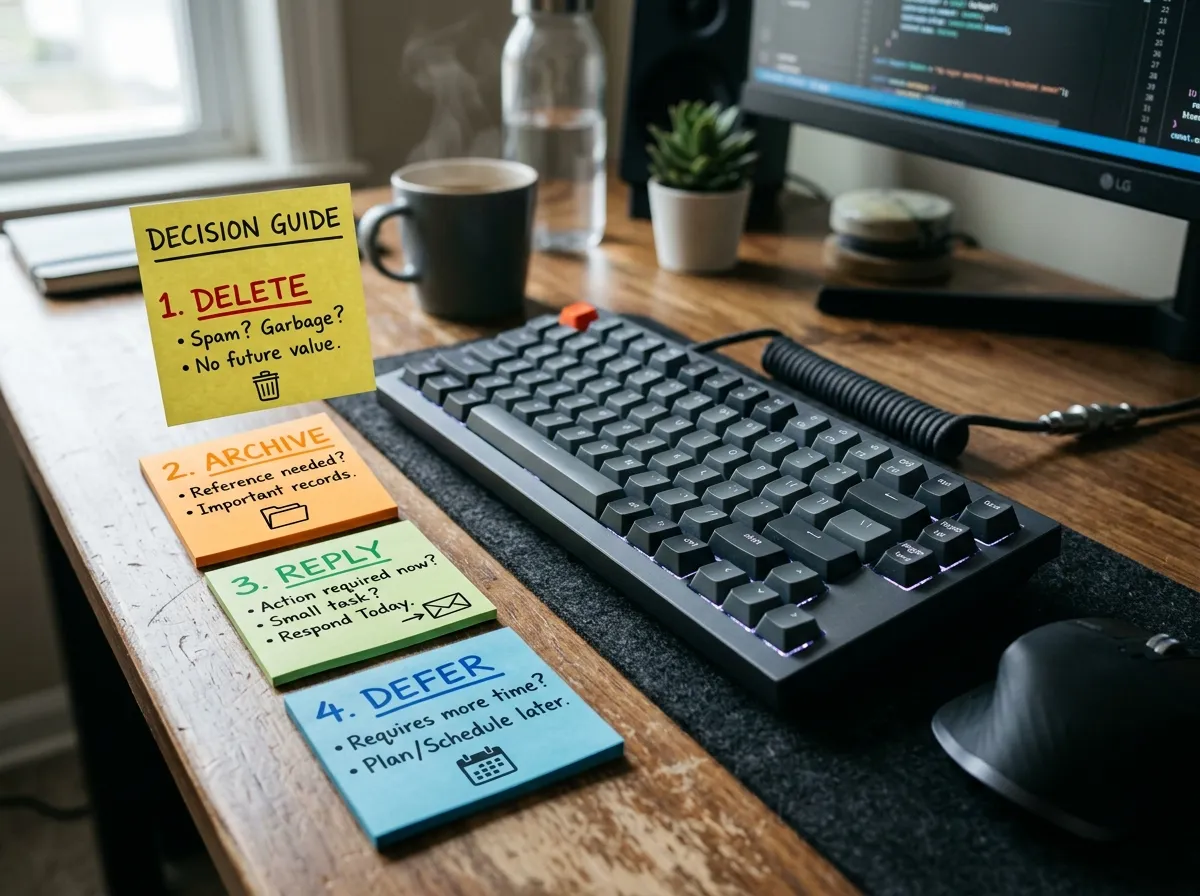
During a processing window, open the newest message and choose one path immediately:
- Delete: junk, expired offers, noise
- Archive: finished information you might search later
- Reply now: if it takes under about two minutes
- Defer: create a task or calendar block, then archive the email
- Waiting: park in a Waiting folder only if you truly need to track someone else’s reply
The failure mode is reading without deciding. If you catch yourself rereading, force a decision or move it to a task with a date. Email is a bad project manager. Your task list or calendar is better.
Step 4: Keep folders boring and few
Beginners often build twenty folders and still search for everything. Prefer a shallow set:
- Archive or All Mail for completed items
- Newsletters for intentional reading
- Waiting for rare follow-ups you must track
- Reference for a small set of living documents (contracts, warranties)
That is enough for most people. Project-specific folders can exist for large ongoing work, but do not nest five layers deep. Search plus archive beats elaborate filing for daily mail.
Step 5: Separate reading from doing
Newsletters and long threads are not the same job as action mail. Process action mail in your scheduled windows. Schedule a separate 20-minute reading block two or three times a week for Newsletters. If you do not open the folder in a week, unsubscribe more aggressively. A folder you never open is a closet of pretend intentions.
Step 6: Handle the backlog without drama
If you have years of mail, do not process every old message. Use triage:
- Search for unpaid bills, travel, legal, and school items from the last 90 days and handle those
- Archive everything older than 90 days in bulk if your job allows it
- Keep a temporary Old Inbox label only if you are nervous, then delete it after 30 days of not needing it
Inbox bankruptcy is allowed once if it creates a clean operating surface. It fails when you do not change arrival volume and decision habits. Bankruptcy plus filters plus scheduled checks works. Bankruptcy alone does not.
A daily processing ritual (15–25 minutes)
- Open only email. Close chat side panels if they derail you.
- Start at the top. Decide each message before opening the next.
- Reply to quick items immediately.
- Create tasks for anything over a few minutes.
- Archive or delete as you go until the inbox is empty or only parked Waiting items remain.
- Scan Waiting once for stale follow-ups.
- Close the client until the next window.
If the inbox is huge at the start of a window, set a timer for 25 minutes and clear what you can. Finish in the next window. Partial progress with decisions beats skimming two hundred messages and deciding nothing.
Weekly review: the safety net for real life
Some weeks explode. Travel, deadlines, and illness break perfect streaks. A weekly review catches the damage early. During that review, glance at Waiting, Newsletters, and any snoozed mail. Clear what aged. Reschedule tasks that were unrealistic.
If you already keep a broader life review, fold email into it. A simple template lives in the weekly review checklist. Email zero is easier when the rest of your open loops get a weekly home too.
Weekly email questions:
- What is still waiting on someone else?
- What did I leave in the inbox because I avoided a hard reply?
- Which new senders should be filtered or unsubscribed?
- Did my check schedule still match this week’s workload?
Tools that help (and tools that distract)
Helpful defaults:
- Keyboard shortcuts for archive, delete, and reply
- Filters for newsletters and receipts
- Snooze only when a message truly should return on a date
- Unsubscribe links and blocked senders
Distracting rabbit holes:
- Building a complex label taxonomy before volume is under control
- Installing multiple email clients and syncing chaos across them
- Auto-responders for everything when a clearer schedule would do
- AI sorting toys you babysit more than you process
Use the simplest client features that enforce decisions. Complexity is not a system.
Workplace realities
If your culture expects instant replies, negotiate clarity. Ask which channels are truly urgent. Move true emergencies to chat or phone. Protect one or two focus blocks where email waits. Document your response windows if needed so expectations are shared.
Shared inboxes and support queues are different games. Those need team rules, ownership tags, and staffing. Personal inbox zero methods still help your private mail, but do not pretend a support queue is a personal Gmail hobby.
Common mistakes
- Using unread status as a to-do list. Convert to tasks and archive.
- Checking email to feel productive. Processing is productive. Refreshing is not.
- Replying instantly to every non-urgent ping. You train people to expect instant access to your attention.
- Keeping newsletters in the main inbox. They will bury action items.
- Skipping unsubscribe work. Zero will feel like a treadmill.
- No weekly review. Life will break the streak and the pile returns silently.
Seven-day starter plan
- Day 1: Unsubscribe from 15 senders. Create Newsletters filter.
- Day 2: Set two email windows on the calendar. Turn off lock-screen previews.
- Day 3: Process for 25 minutes with one-pass decisions.
- Day 4: Clear or archive a chunk of backlog older than 90 days if safe.
- Day 5: Create Waiting and Reference only if needed. Resist extra folders.
- Day 6: Full processing session until inbox is empty.
- Day 7: Weekly review of Waiting and filters. Adjust the schedule.
After day seven, maintain rather than reinvent. Add filters when new noise appears. Keep the review. Protect the windows.
How you will know it works
Success looks like:
- You know when you will see email next
- The inbox reaches empty at least a few times a week
- Hard replies live on your task list with dates
- Newsletters no longer ambush action mail
- You feel less hunted by badges
Perfection every day is not required. Recoverability is required.
Sample replies that keep processing fast
Beginners stall on hard emails. Short templates unblock the pass:
- Need time: “Thanks for this. I will reply properly by Thursday.” Then create a task and archive.
- Decline politely: “I cannot take this on right now. Sharing X as an alternative.”
- Clarify: “Quick check before I proceed: do you want A or B?”
- Close the loop: “Confirming this is done on my side. Shout if anything is missing.”
Save three personal versions in your notes app. Speed of decision matters more than literary elegance during a processing window. You can write a longer message later when the task is scheduled.
Email and your other systems
Inbox zero collapses when email is your only system. Calendar holds time-bound commitments. A task list holds actions. Notes hold reference. Email holds messages. When those roles blur, the inbox becomes a junk drawer again.
During processing, ask “where does this live?” If it is a meeting, it belongs on the calendar. If it is a chore, it belongs on a list with a date. If it is a file, save it to the right folder and archive the thread. The inbox should not remain the home of unfinished life admin.
This is why a weekly review helps. Open loops escape every system. A recurring review gathers escaped loops without requiring constant inbox staring. Keep the review short and honest rather than turning it into a second full-time job.
Travel weeks and high-volume seasons
Travel, launches, tax season, and school start will spike volume. Plan for the spike instead of treating it as failure:
- Add one extra processing window on peak days
- Raise the unsubscribe bar temporarily for new promo mail
- Use an auto-reply only if it reduces repeat pings
- Accept that Waiting may grow and clear it in the weekly review
- Protect one daily block where email stays closed so deep work survives
High-volume seasons are when weak systems break and simple systems prove themselves. Keep folders few, decisions fast, and windows visible on the calendar.
A note on guilt
Unread counts and old threads can feel like proof you are failing. They are usually proof that volume exceeded process. Change the process and the guilt shrinks. Bulk-archiving ancient mail is not laziness when those messages no longer need action. Caring about today’s decisions is enough.
If a particular thread carries emotional weight, handle it outside the speed pass. Put a real block on the calendar, write the reply there, and return to normal processing afterward. Mixing emotional correspondence with newsletter triage is how sessions stall.
The one-pass decision script
Beginners reread. Rereading feels like work and produces no outcome. Use a spoken or written script for each message so the pass stays honest:
- Delete or archive: “No action, no keep.”
- Reply now: “I can finish this in under three minutes.”
- Task it: “This needs time, tools, or someone else.” Write the next action, date it, archive the thread.
- Calendar it: “This is time-bound.” Create the event, archive.
- Filter it: “This is recurring noise or reading.” Build the rule once.
If you cannot choose in fifteen seconds, the message is almost always a task, not an inbox resident. Ambiguity is a signal to move work out of email, not a reason to leave the message glowing unread.
Practice the script on a quiet Tuesday with twenty messages before you attempt a thousand-message backlog. Skill first, archaeology second. A clean decision muscle makes bulk sessions less emotional.
Backlog triage without a shame spiral
Old mail is not a moral ledger. Most messages older than ninety days are either obsolete or searchable later if you archive by sender. A practical backlog approach:
- Search for unpaid invoices, legal deadlines, and anything with your name in active projects. Handle those first.
- Archive newsletters and promotions older than thirty days in bulk after you unsubscribe from the worst senders.
- For everything else older than six months with no obvious action, archive in chunks of 500. Your search still works. Your brain stops paying rent on the unread count.
Call this “inbox compost,” not bankruptcy. Bankruptcy language suggests failure. Composting suggests you are turning dead volume into searchable soil so today’s seedlings can grow. If a true needle appears later, search finds it. The unread badge was never a reliable needle detector anyway.
VIP humans and noisy tools
Not every sender deserves the same lane. Create a VIP star, label, or notification exception for people whose mail should break a batch: your manager, a co-parent, a key client, a school nurse line. Keep that list tiny. If everyone is VIP, nobody is.
Noisy tools (project bots, calendar invites, login alerts) should skip the emotional inbox when possible. Filter bot mail to a Tools folder and check it once per processing window. Login alerts can go to a Security folder you glance at daily. The point is to stop letting a CI bot and your sibling’s message compete for the same adrenaline.
When a VIP path exists, you can silence the badge on the main inbox app more aggressively. The fear of missing a human is what keeps beginners checking constantly. Remove that fear with a short VIP list, then batch the rest.
Starter plan: fourteen days to a maintainable zero
Week one builds the pipes. Week two proves you can recover.
- Days 1–2: Unsubscribe and filter. Aim for a noticeable drop in arrivals before you chase emptiness.
- Days 3–4: Pick two daily processing windows. Put them on the calendar. Silence badges outside those windows if your life allows.
- Day 5: Practice one-pass decisions on new mail only until the live inbox is empty once.
- Days 6–7: Compost a slice of backlog. Stop when the timer ends. Schedule the next slice.
- Days 8–10: Keep windows. Add Waiting and Reference only if real messages need them.
- Days 11–12: Write three reply templates. Use them in a real processing session.
- Day 13: Run a weekly review: Waiting folder, calendar vs. tasks born from email, filter tweaks.
- Day 14: Measure: how many times did you reach empty? How often did you check outside windows? Adjust length of windows, not the existence of the system.
If day fourteen still feels shaky, shrink the goal to “empty at least three times this week” rather than “empty forever.” Recoverability beats a fragile streak.
FAQ
How long does it take to reach inbox zero the first time? If volume is moderate and you unsubscribe first, many beginners reach a clean inbox in a few focused sessions across one week. Huge backlogs may need a bulk archive strategy before daily zero is realistic.
Do I need special software? No. Your existing email client plus filters, archive, and a task list is enough. Special tools are optional.
Is snooze cheating? Snooze is useful when a message should return on a real date. It is harmful when you snooze to avoid decisions. Use it sparingly.
What if my boss emails at all hours? Clarify expectations and urgent channels. You can still batch non-urgent mail. Instant availability for everything is a culture problem, not only a personal failing.
Should I use multiple inboxes? One primary inbox with filters is usually calmer than scattering attention across many accounts without rules. If you need multiple accounts, give each a role and a check schedule.
How do I maintain zero on busy weeks? Shorten processing windows but keep them. Use the weekly review to catch stragglers. Reduce new subscriptions so recovery is faster.
What if I fall a week behind? Do not read every message in order. Scan for VIPs and deadlines first, task what matters, then archive the rest of the week in bulk. Restart windows the next day.
Is archive safer than delete? For uncertain messages, yes. Archive keeps search. Delete when you are sure it is junk or a duplicate. Either beats leaving mail in the inbox as a fake to-do list.
Related: How to Unsubscribe From Email Overload · Weekly Review Checklist